Inside the new Marlins Park, home of the Miami Marlins, is a swanky bar created by The Clevelander South Beach. The Clevelander holds approximately 250 guests with field level seats complete with a bar, dancers, body painting and DJs live from the pool area. Adding moving light to this excitement are nine CHAUVET Professional Q-Spot 260-LED moving heads. Here are a few photos:
CHAUVET Professional MVP 18 video panels traveled on tour with Borgore, Israeli dubstep producer, DJ and former drummer of death metal band Shabira. Borgore’s music features triplet drum patterns with touches of heavy metal. The MVP 18 panels made up the façade for the DJ booth and displayed colorful animation graphics.
The ILUMINARC line of architainment lighting solutions had a presence at LightFair 2012. Among the LED-fitted exterior and interior fixtures — including the line’s LΩgic system — were two new wash lights: Ilumipanel 40 IP and Ilumipod 18g2 IP. Below are some photographs of the booth and fixtures.
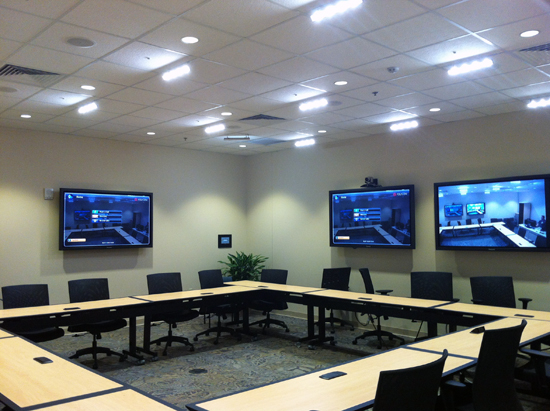
Eight rooms on three different campuses belonging to Florida Hospital health care provider are equipped with Ilumiline Logic 12 VW interior lighting solutions from CHAUVET Professional’s ILUMINARC line. Sound Stage Inc., an audio and video installation company, discovered the lights during InfoComm 2010 and has installed about 50 fixtures in total for Florida Hospital, each room averaging six of the linear wash lights. Featuring SpectraWhite Technology, Ilumiline Logic 12 VW is perfect for creating the right conditions for videoconferencing. “The problem with videoconferencing is that if you don’t address the lighting and the sound in the right way, it’s a horrible experience,” said Chet Neal, vice president of Sound Stage Inc. “But we know there won’t be any problems using Ilumiline Logic 12 VW lights.”
Lake City Bank, located in Indiana, employed five well-placed ILUMINARC Ilumipod Inground Tri-3 IP exterior wash light solutions to uplight its facility at night. The fixtures, specified by Jon Underwood of ESL Spectrum, run with the help of the Ilumicode Addresser. Selected for their photometry and output—in comparison to the size of the columns—the Ilumipod Inground Tri-3 IP are discreet, powerful and run more efficiently due to the tri-colored LEDs.
The Marlin Hotel, located in South Beach, has been reborn with the help of ILUMINARC LΩgic fixtures, which are part of the CHAUVET Professional line. The color changing LED-fitted lights are part of the LΩgic System which work seamlessly with the Savant system installed in the hotel, whereby room amenities as well as the lights are controlled by an iPad. Lighting Designer Geoff Farrell talks about the project in more depth in this visual case study:
CHAUVET Professional interviewed Scott Chmielewski, president of Digital Media Designs and experienced lighting designer who has been involved in various projects including the 2008 Summer Olympics in Beijing and our own award-winning booth at LDI 2011. Click here to see part 1 of the interview. And watch part two:
More than 90 CHAUVET fixtures took center stage as part of a one-of-a-kind show organized by Algam, our distributor in France, that brought together Algam’s professional customers in audio, light and video. About 250 people enjoyed the two-day event that featured a 10-minute light show designed by François Guillet, with a score by Pascal Foulard aka DJ Paco. Special guests included violinist Caroline Stenger and CHAUVET luminaires: 36 Legend 412 pixel-mapping moving yokes, 24 MVP 18 and 24 MVP 37.5 modular video panels, six Q-Spot 560-LED moving heads, six COLORado 1-Quad Tour wash fixtures, five Q-Wash 560Z-LED wash lights, four Q-Wash 260-LED fixtures, four COLOrado 2 Zoom Tour, four COLORado Zoom Tour, four COLORado 1 Tour, eight SlimPAR Pro Tri wash lights, six COLORband PiX linear fixtures, three COLORado Batten 72 Tour, two Impulse 648 strobe lights and one Arena 2100 Flex fog machine. A video of the full programmed show is below.
Guest violinist Caroline Stenger.
Algam and CHAUVET crew.
CHAUVET Vice President Berenice Chauvet delivering a speech.
Mike Graham looking pensive in front of MVP modular video panels.
Written by Mike Graham, product manager for CHAUVET Professional
I can remember sitting in the audience during a show on one of the ships, I was auditing. There was a banjo player on stage and he was working on creating a mood. He was trying to create the image of sitting on his grandfather’s front porch in the evening learning how to play the banjo. All of a sudden, every single moving light in the rig started doing ballyhoo. In Technicolor. It looked like a scene from Close Encounters of the Third Kind and I wanted to crawl into a hole and die. The mental image, destroyed for the audience and the banjo player was about as mad as a banjo player can get. The point is that in a situation like this, on can accomplish more with less. More often than not, this applies.
In the above case, I have to think that the programmer simply lost their mind for a minute. Clearly, they were not thinking about the talent onstage. Or how to serve the show best. In a stage show, such as a rock concert, or even on a cruise ship, you have a ton of lights in the rig because you have to be able to create tons of different looks.
A rock show is completely different from the straight play I wrote about before. One of the great things about moving lights is that you can position them wherever you want with the roll of a wheel, a slide of a fader, or a stroke of a key. The basic principles of front, side, top, down, and back lighting still apply. However, now it is ok to add in a little flavor—BUT ONLY WHEN NECESSARY. For a great lesson in this, I highly recommend checking out the U2 concert video for Rattle and Hum. Largely shot in black and white, you can clearly see how certain songs call for strong beams of light to position down onto each member of the band at certain times. The end result is absolutely stunning. Some of my favorite looks are just simple shafts of light coming from asymmetrical positions. I really like to have odd angles coming in from at least two positions. If you have good spot light operators, it is even better!
Moving lights can also lend themselves to becoming an evil temptation. Yep, they move, change color at the blink of an eye, and you can even drop in a gobo. For some programmers, this is like putting a Twinkie in front of the sound guy. Just because a light has a particular function, it does not mean you have to use it every cue. Once I discovered the move-in-black function on the Wholehog II, it was like someone gave me the key to life. I learned how to use moving lights as a conventional light (conventional lights are lights that don’t move, have one color in them, and are focused to a specified location). Now, I could make these big “statement” looks like I saw in all of these concerts I had seen before. I was also able to effectively use the tools at hand and create a Zen-like state in my shows. It gave me the subtle lighting show that I wanted to have without having distractions. I found that I was much more at peace with the whole process once I figured out that you don’t have to overdo it.
Another important part in the Zen of programming is that you, as a programmer and designer, must be in a place in your mind where you are at peace. You must be clear of mind so that you can make good choices. In order to be clear of mind, you must know what you are programming and for what type of show. Know your act and know your audience. If you are doing a Rush show, go big with big beam looks and excitement. If you are doing something that calls for an intimate design, then that is what you should do…create a mood. Becoming part of the environment is critical to this. (I am not saying to become the lights, but hey, who am I to argue if you do?) The goal should be to feel at ease with your lights. If you watch a true master of design and programming at work, it looks easy. A true Zen master will be so in-tune with what is going on around them that they are completely aware of their surroundings. For me, if I am able to, I will video tape a rehearsal and work from it. This gives me the ability to design and program without the act there if I have to. This way, I don’t have the pressure of having to rush to get my looks down. I also try to be alone. Too often, people who are “just trying to help” will really ruin your Zen thing. Turn off the cell phone, put on your headphones and get into your zone.
Keep in mind as you go, “Does this look natural?” How does the color reflect the mood of the subject? Is the lighting conveying this mood? Should this be a sharp beam effect or diffused? Does this call for a gobo breakup? Do I need a strobe light hit here? Every lighting change must be motivated. I can remember hearing over and over in acting class, “What is your motivation?” Well, what is it? Is there a change in the action that calls for you to write a cue? Did your principal actor just cross from stage right to stage left? Did your band just change tempo? Was there a murder on stage? If the answer is yes, then write a cue. If there is no change in action on stage, then there is no need. I’m sorry, but “Because it’s in the script” typically is not good enough and may need to be challenged. So challenge it. Wisely.
Now go forth, young Grasshopper, there is nothing more to teach today.
1. How did you get into this field?
While I was a performer in the late 90s around the southwest Michigan local music scene, I had a friend who had just bought new “scanners,” which were the coolest light I had seen at the time. This friend taught me how to put it all together and how to run the console. I nagged my roommate who was working for a stagehand company for a job, got it, and a few hundred gigs later, a major move: he I am. Those first scanners opened the door to a career that I’m proud and honored to have.
2. What do you think is the next big thing in the lighting industry?
I’d like to see where LED technologies are heading. As pixel mapping, video and lighting controls merge and become more user friendly, I see more dynamic light shows and designs that move visually not physically. Plus, an obvious shift toward green productions should encourage LED tech growth.
3. Do you have a favorite fixture (and why)?
That’s a hard call. Out of LED lights, it’s the COLORado Batten 72 Tour. I personally road tested these; they are tough and have a great output. I also like the Vari-Lite VL2000 Spot moving light and the MAC 2000 family. I have grown to like the CHAUVET Intimidator family of LED moving heads – small but will surprise you.
4. What has been your favorite design/project?
Honestly, I have enjoyed any of the concert or touring acts that I’ve designed or worked with – yes all of them. Music and lights work like peanut butter and jelly: they are good by themselves, but are even better when combined. As long as I get to design for music acts, I’ll be a happy man. Willie Nelson was pretty cool though!
5. What was the biggest unforeseen obstacle that you’ve faced in one of your designs, and how did you overcome it?
Every design or show will have unforeseen obstacles. In fact, there’s a saying, “it’s not a gig till something goes wrong.” Recently it’s been software-related obstacles from my rendering software. It’s hard for me to gauge what challenge was the “biggest,” but with a good support crew almost all obstacles can be overcome.
6. Complete this thought: A show without light is like …
… paying for a high-definition DVD then watching it on an old black-and-white 19-inch CRT TV.